Download backups
Overview
This guide explains how to download backups.
Backup file names
Backups are organized as timestamped directories indicating when the backup started. The snapshot directory is a working directory for backup logic and should not be modified.
Each timestamped directory contains individual app backups with the naming pattern app_<location>_v<package_version>:
- tgz format: Files have a
.tar.gzextension - rsync format: Backups are directories without extensions
Email backups use the pattern mail_v<box_version>.tar.gz (or without extension for rsync).
Platform backups use the pattern box_v<box_version>.tar.gz (or without extension for rsync).
File system
Download a backup when using the Filesystem provider with a tool like scp.
$ scp root@<ip>:/var/backups/2022-04-05-184006-496/app_wekan.cloudron.space_v4.19.2.tar.gz .
S3 (UI)
For S3 compatible providers, use the storage provider's UI to find the latest timestamp. For example, in DO Spaces:
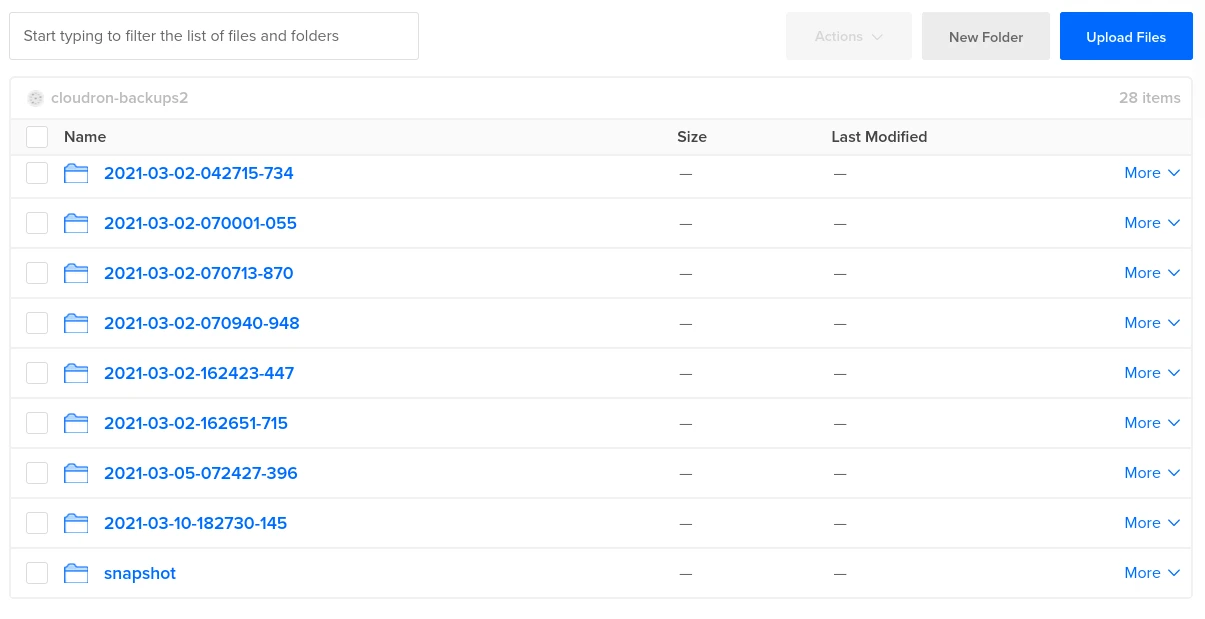
In the screenshot above, 2021-03-10-182730-145 is the latest backup. Navigate into the directory and download the files.
S3 (AWS CLI)
Some S3 providers lack a UI or the UI fails to load with many objects. Determine the backup ID using the AWS CLI.
-
Install the AWS CLI tool:
- Linux:
sudo apt install awscli - Other platforms: See this guide
- Linux:
-
List the objects using the CLI tool. The
AWS_DEFAULT_REGIONmay need to be the provider's region name orus-east-1, depending on your provider. In the example below,cloudron-backups2is the bucket name. If you configured a prefix, lists3://cloudron-backups2/prefixinstead:
$ export AWS_ACCESS_KEY_ID=JWAJUADXZJU2LBPBQLG2
$ export AWS_SECRET_ACCESS_KEY=SomeSecretKeyThatCannotBePublic
$ export AWS_DEFAULT_REGION=us-east-1
$ aws --endpoint-url=https://sfo2.digitaloceanspaces.com s3 ls s3://cloudron-backups2/
                           PRE 2021-03-02-162423-447/
                           PRE 2021-03-02-162651-715/
                           PRE 2021-03-05-072427-396/
                           PRE 2021-03-10-182730-145/
                           PRE snapshot/
The latest timestamp is 2021-03-10-182730-145. List the contents of that directory:
$ aws --endpoint-url=https://sfo2.digitaloceanspaces.com s3 ls s3://cloudron-backups2/2021-03-10-182730-145/
2021-03-10 10:27:33    7129765 app_wekan.cloudron.space_2021-03-10-182732-640_v1.2.0.tar.gz
2021-03-10 10:27:34     422273 box_2021-03-10-182734-919_v6.2.3.tar.gz
Use aws s3 sync to download the file.