 Ampache
About
Ampache is a web based audio/video streaming application and file manager. Allowing you to access your music & videos from anywhere, using almost any internet enabled device.
- Questions? Ask in the Cloudron Forum - Ampache
- Ampache Website
- Ampache issue tracker
Import audio files
Ampache works with audio catalogs. To import songs into Ampache:
-
Create a directory for it through the File Manager. For example create
/app/data/catalogs/music. You can upload new audio files to this folder now or later. -
Create a new catalog. You can do this by clicking the
Adminicon (next to the gear icon).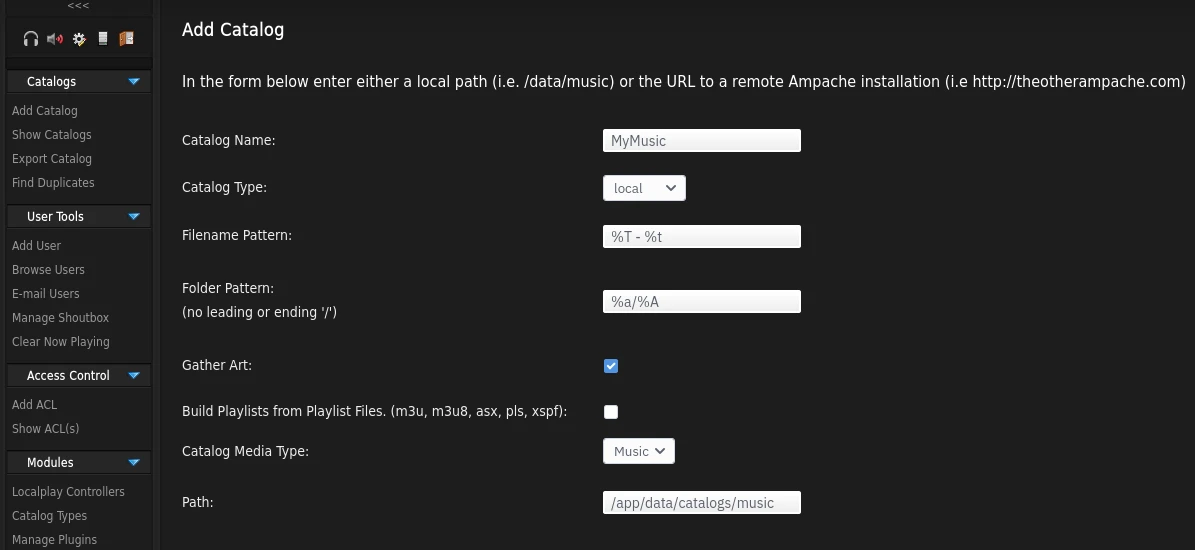
-
Set the catalog type to
local -
Set the directory path
/app/data/catalogs/musicin the path text input -
Trigger a catalog update via the ampache UI to update the catalog.
Single Sign-On
Ampache is pre-configured for OpenID Connect. Use the Sign in with Cloudron button on the
login page to authenticate against the Cloudron user directory. The account is created on
first login with the user access level and can be promoted under Admin > Users.
Username and password login keeps working next to it. API and Subsonic clients cannot use OIDC, so those users either log in with their Cloudron credentials over LDAP or use an API key from their account page.
Customization
Use the Web terminal or the File Manager
to edit custom configuration under /app/data/config/ampache.cfg.php. Full documentation
is available here.
Playback issues
For larger audio files, ampache often needs more memory to play them.
Unlike other php based apps, increasing the memory limit in php.ini will get overwritten.
The correct file for ampache is /app/data/config/ampache.cfg.php:
memory_limit = 512M;
CLI
Ampache CLI can be used to run various common management tasks. You can use the CLI using the Web terminal as follows:
gosu www-data:www-data /usr/bin/php /app/code/bin/install/catalog_update.inc
Features
Ampache has a lot of exciting features that are worth exploring further: